

Peloton Stack Limit Jumps From 10 to 25 Classes
Peloton Stack Limit Quietly Climbs to 25 Classes
Members can now line up 25 classes back to back, a welcome upgrade Peloton has not announced.
The Peloton Stack limit has quietly moved from 10 classes to 25. A screenshot from the Peloton app shows a banner reading “You’ve hit the 25 class limit” next to an Edit stacks button, though Peloton has not announced the change.
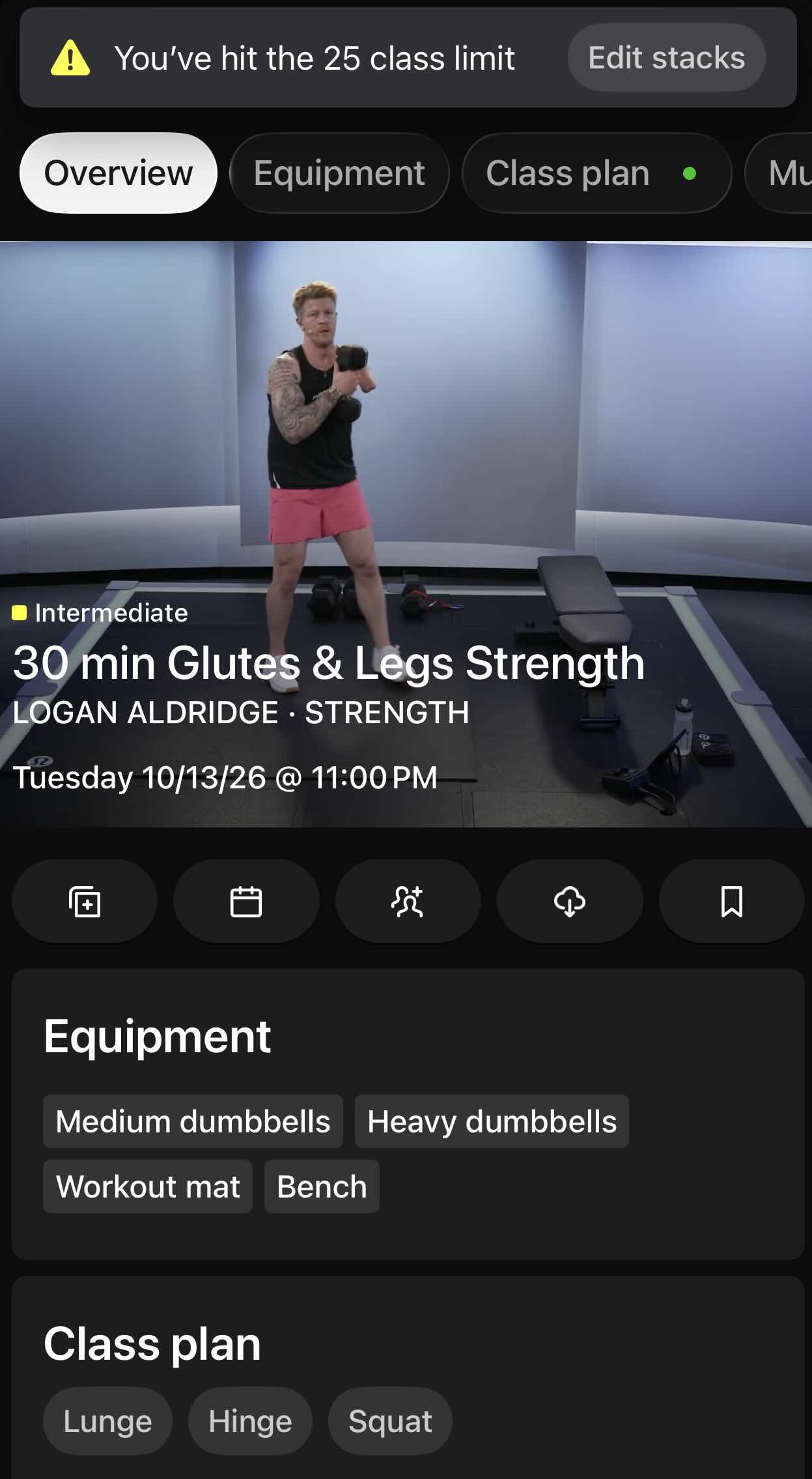
Note the alert at the top indicating the new Peloton stack limit
Stacking lets members line up on-demand classes to play back to back, and it has been part of the platform since 2021. Tread runs, Strength sessions, Yoga and more can share one Stack. For members asking how many classes you can stack on Peloton, the answer in the screenshot is now 25. Under the previous Peloton Stack limit of 10, planning a full week of workouts meant refilling the queue often.
The Peloton Stack Limit is the Latest Iteration
This welcome news comes on the heels of the last update, in March. At that time, Peloton began letting members remove classes from a full Stack and keep adding without starting over. This flexibility was well received at the time, but at that point, the cap was still 10.
June modifications included the “Continue Stack” and “Add and Swap” buttons. Things were looking up, but that 10 class limit was still there.
Why a 25-Class Stack Helps

Short formats benefit most. For example, members who like to build routines of 5, 10, 15, or 20 Minute classes can more easily customize their workouts. This now allows more flexibility for Peloton’s “Extra” style of classes, such as “Extra Steps” or “Extra 10” add-ons.
Another benefit is that while members still await a “Favorites” option, having 25 slots to play with allows for some “on the list” style bookmarking within Stacks while not actually doing the class yet, like a pile of “to be read” books.
And of course, the Type-A planners among us can use the room to get even more organized for not only the week but the month ahead.
This attention to Stacks, along with the Note to Self and the recent ability to high five people from outside the class are some of Peloton’s most popular updates this year.
Members who build large Stacks should check their own app, since earlier Stack changes reached devices gradually. The Peloton Stack limit may look different from one device to the next until the rollout settles.
How will you use the extra room?
The Clip Out is an independent Peloton news site with reporting, analysis, and community insights. We deliver breaking updates, feature reporting, and expert context on the stories driving the community and the industry.
Our weekly podcast offers deeper conversation and perspective, and you can find us on Apple Podcasts, Spotify, iHeart, TuneIn, and YouTube Music. You can also follow us on our socials on Facebook, Threads, Instagram, BlueSky, and YouTube.
See something in the Peloton universe that you think we should know? Visit us at theclipout.com and submit a tip.
About the Author: Elizabeth Schlosberg



Subscribe
Keep up with all the Peloton news!