

Peloton Tread Instructor-Guided Shortcuts
Peloton Tread instructor-guided shortcuts are now live, a new setting that puts pace-target speeds on screen automatically every time an instructor calls out a new effort during a walk or run. The feature builds on Pace Targets, which translate an instructor’s effort call, like “moderate pace,” into a personal speed range based on the difficulty level a member has selected.
How Peloton Tread Instructor-Guided Shortcuts Work
With the setting turned on, along with the separate “Show shortcuts when cues change” setting, a box appears above the current speed display every time the instructor calls a new pace target. That box shows three numbers: the bottom, middle, and top of the member’s set range for that effort. Instead of calculating the right speed mid-run, a member can tap directly to one of the three values.
Members aren’t required to use the new setting. The Tread still supports custom shortcuts set manually by the user, and that option remains available in the settings menu alongside the new one.
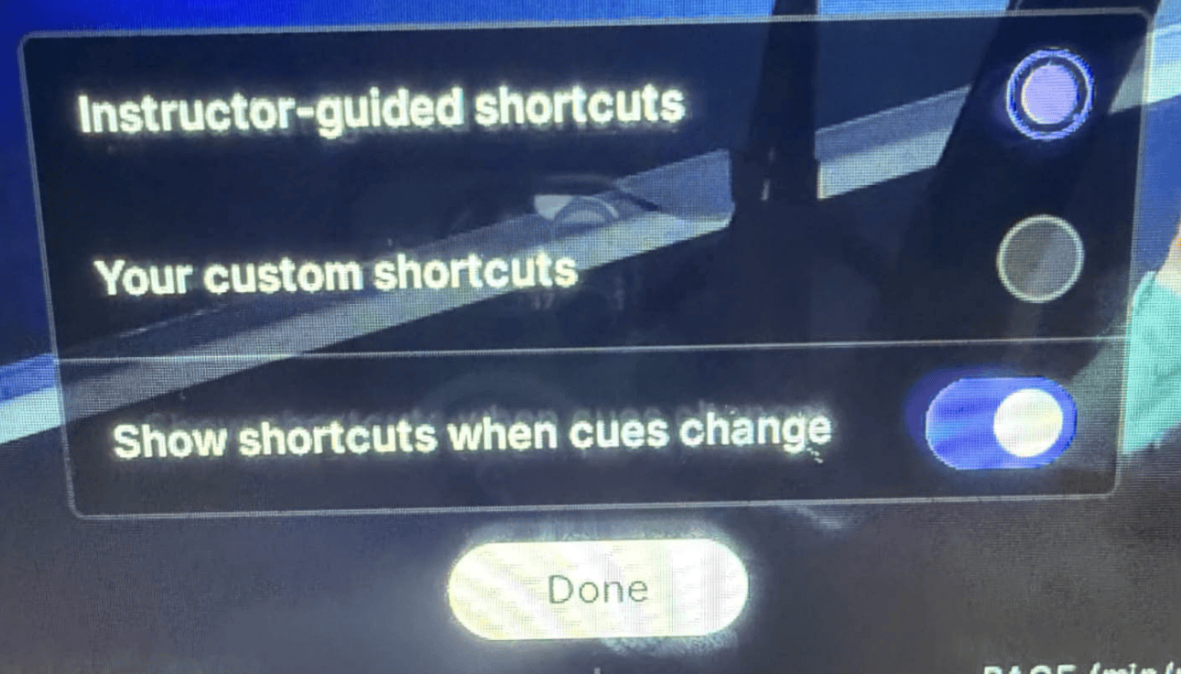
So what happens if you already have custom shortcuts and you want to use those? No worries. You can just ignore what the instructor calls out. The ranges only briefly show up as you switch to the new effort (and only on pace target classes). So, if you want to ignore one set, or all, that is fine and your normal shortcuts are still available. The only thing to note is that you can’t see both sets of shortcuts on the screen at the same time.
Peloton hasn’t published details on how widely the feature has rolled out or whether it’s live on both Tread and Tread+ at this stage. We’ll update this piece once platform availability and rollout scope are confirmed.
The Clip Out is an independent Peloton news site with reporting, analysis, and community insights. We deliver breaking updates, feature reporting, and expert context on the stories driving the community and the industry.
Our weekly podcast offers deeper conversation and perspective, and you can find us on Apple Podcasts, Spotify, iHeart, TuneIn, and YouTube Music. You can also follow us on our socials on Facebook, Threads, Instagram, BlueSky, and YouTube.
See something in the Peloton universe that you think we should know? Visit us at theclipout.com and submit a tip.
About the Author: Crystal OKeefe

Latest Podcast


Subscribe
Keep up with all the Peloton news!