

Craft Your Perfect Peloton Workout Plan With Claude Cowork
Building a personalized Peloton workout plan that actually fits your life takes more than just picking a Monday class. You need something that accounts for your favorite instructors, balances your equipment time, aligns with your strength training days, and still feels achievable when Thursday hits and you’re exhausted.
Or, maybe you’ve tried the ChatGPT integration and it isn’t living up to your expectations. Claude Cowork is a great, and perhaps even better, solution to automating your fitness planning.
If you’ve struggled with creating a Peloton workout plan that works for your actual schedule rather than some idealized version of your life, there’s a faster way. By using Claude Cowork (Anthropic’s desktop automation tool) with the Peloton member schedule, you can generate a Peloton workout plan that’s tailored to your constraints in minutes rather than hours of manual scrolling. Essentially, you can create an AI assistant that will create a fitness plan built for your specific needs and goals.
Why Manual Planning Falls Short
The Peloton schedule is vast. At any given moment, hundreds of classes sit waiting across the Bike, Tread, and Row. Instructors teach at different times. Some classes are live, some are encore. Class durations range from 10 minutes to 60 minutes. Your favorite instructor might teach at 6 a.m. on Wednesday or 7 p.m. on Saturday.
When you try to build a Peloton workout plan by hand, you’re juggling multiple priorities: your available time windows, your preferred instructors, equipment variety, and fitness goals. The mental load alone can make you skip the planning step entirely and just wing it.
How Claude Cowork Simplifies Your Peloton Workout Plan
Claude Cowork lets you automate the planning process. Here’s the approach:
Start by defining your constraints. Specify which days work for cardio versus strength training (if you’re doing Tonal on alternate days, for example). List your preferred instructors. Set time windows that actually match your schedule. Define how many Bike, Tread, and Row classes you want each week.
From there, Claude Cowork can help you pull available classes, filter by your preferences, and surface the best options for your Peloton workout plan. It removes the guesswork and the endless scrolling.
Building Your Framework
A solid Peloton workout plan starts with structure. Decide which days are cardio days and which support your cross-training. If you’re working with a program like Peloton’s Personalized Workout Program or building splits like Rebecca Kennedy’s 5-Day Split, make sure your Peloton workout plan complements it rather than competing.
Next, identify your instructors. Some riders gravitate toward a Peloton instructor for every mood, while others have three or four go-to coaches they trust. There’s no right answer, but knowing who you want matters. If you’re drawn to intensity, you might prioritize different instructors than someone building endurance.
Then set equipment targets. Most riders benefit from mixing disciplines. A balanced Peloton workout plan might include at least two Bike classes, two Tread sessions, and one Row class each week. This variety keeps workouts fresh and builds well-rounded fitness.
Aligning Peloton With Your Larger Training
One of the biggest challenges in building a Peloton workout plan is making it fit alongside other training. If you’re using Peloton Personal Trainer for guidance or stacking classes using the Peloton Stack feature, your cardio days need clear boundaries. Claude Cowork helps because it forces you to be explicit about those constraints upfront, rather than discovering conflicts mid-week.
How to Set It Up
Building an automated Peloton workout plan using Claude Cowork starts with defining your preferences, then letting the automation handle the weekly legwork. Note: Claude Cowork is available only on Claude’s paid plans.
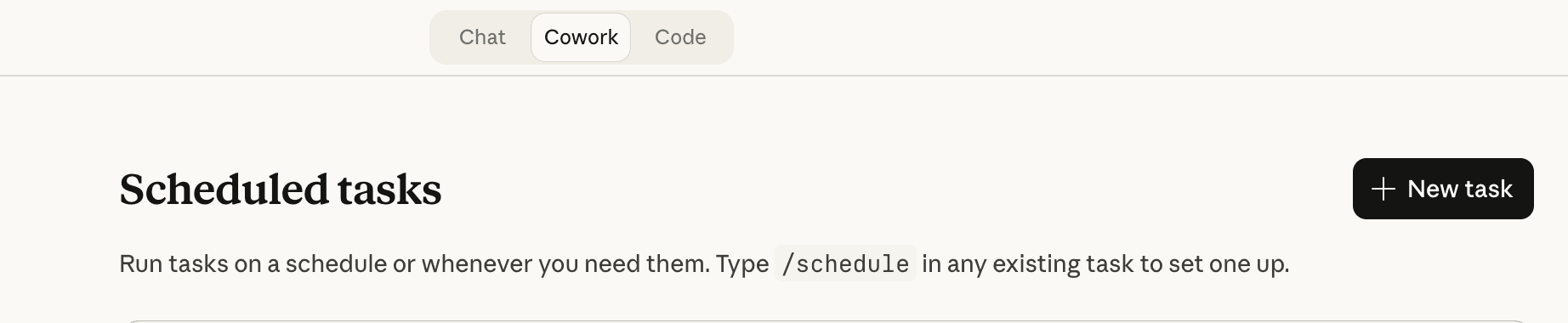
Define Your Preferences
Open Claude Cowork and describe your Peloton workout plan parameters. Be specific about:
- Cardio days: Which days of the week work for your Peloton workouts
- Preferred instructors: List 4-6 instructors you trust and want to feature in your Peloton workout plan
- Instructors to avoid: If there are coaches you don’t want included, name them
- Equipment targets: How many Bike, Tread, and Row classes per week do you want in your Peloton workout plan
- Class duration preferences: Do you prefer 20-30 minute classes for intensity, 45-60 minutes for endurance, or a mix
- Live vs. on-demand: Whether you want to prioritize live classes or if on-demand works equally
Let Claude Cowork Build the Automation
Claude Cowork will create a workflow that:
- Pulls your full 2-week Peloton schedule automatically
- Filters classes based on your preferences (preferred instructors, equipment type, duration)
- Builds a balanced Peloton workout plan that spreads equipment variety across the week
- Presents the complete plan to you for review
Review and Approve
When your Peloton workout plan is ready, review it carefully. The automation will show you each class day by day, with the instructor, duration, equipment type, and whether it’s a live class or on-demand. You’ll have the option to approve the plan as-is or request swaps if something doesn’t work.
This is where you maintain control. If Tuesday’s class conflicts with your schedule or you’d rather swap instructors on Thursday, you can ask for changes before anything gets added to your Peloton schedule.
Automatic Scheduling
Once you approve, Claude Cowork does the clicking for you. It navigates to the Peloton website, finds each approved class, and adds it to your Peloton schedule. Live classes get scheduled; on-demand classes are noted so you know you can take them anytime.
The result: a personalized Peloton workout plan that arrives every week, fully built and ready to execute.
The Inherent Value
The beauty of automating your Peloton workout plan is that you’re not reinventing the wheel every Monday. Once you define your preferences once, the system pulls from your actual schedule data and respects your constraints automatically. No more guessing whether Sam Yo teaches at a time that works. No more wondering if you’ve balanced your equipment. The Peloton workout plan builds itself.
Capturing the Live Class Advantage
The automation methodology includes LIVE classes as bonus opportunities, and this is worth keeping. Your Peloton workout plan doesn’t need to be rigid. Once you have a solid framework, you can stay flexible enough to join a live session with your favorite instructor when it drops on the schedule. The structure keeps you accountable; the flexibility keeps you sane.
The Real Payoff
Building a data-informed Peloton workout plan isn’t about optimization for its own sake. It’s about removing decision fatigue. When you open Peloton on Wednesday morning, you know what class you’re taking and why. You’re not choosing between 40 options. You’re executing a plan you designed specifically for yourself.
That consistency compounds. Over weeks and months, a thoughtful Peloton workout plan delivered consistently creates the kind of progress that spotty, random scheduling never can.
Key Takeaways
- Use Claude Cowork to define your Peloton workout plan constraints upfront, reducing weekly decision fatigue
- Match your Peloton workout plan to your strength training schedule (whether that’s Tonal, another program, or on-platform strength)
- Balance equipment variety into your Peloton workout plan for full-body fitness
- Align class duration to your goal (shorter for intensity, longer for endurance building)
- Keep your Peloton workout plan flexible enough to catch bonus LIVE classes with instructors you love
- Review your Peloton workout plan weekly and adjust as life changes
The Clip Out is an independent Peloton news site with reporting, analysis, and community insights. We deliver breaking updates, feature reporting, and expert context on the stories driving the community and the industry.
Our weekly podcast offers deeper conversation and perspective, and you can find us on Apple Podcasts, Spotify, iHeart, TuneIn, and YouTube Music. You can also follow us on our socials on Facebook, Threads, Instagram, BlueSky, and YouTube.
See something in the Peloton universe that you think we should know? Visit us at theclipout.com and submit a tip.
About the Author: Crystal OKeefe




Subscribe
Keep up with all the Peloton news!