
Peloton Classes Not Counting: Status Update on Glitch from Feb 9
If you have noticed your Peloton classes not counting toward your Program progress this week, you are certainly not alone in your frustration. Over the last few days, we have seen a significant number of reports from members who are completing workouts only to find that the system isn’t giving them the credit they have earned.
It is disheartening to finish a tough session in a structured Program like Crush Your Core or Road to Your 5K, only to see the checkmark missing. For many of us, that visual progress bar is a huge motivator. When it stalls due to a technical error, it feels like the effort didn’t happen, even though your legs know otherwise.
We are writing this to confirm that this is a known, widespread issue, not a user error on your part. Here is exactly what is happening, what you should avoid doing, and how to stay updated on the fix.
Program Progression Stalled with Classes Not Counting
The core of the problem is specific to Peloton Programs. While your workout history might still show that you took a class, the specific credit required to advance to the next stage of a Program isn’t triggering correctly.
Typically, when you take a class within a Program, the system automatically marks that day or module as complete. Right now, that handshake between the class completion and the Program tracker is broken.
We have seen anecdotal evidence piling up. The story is consistent: you take the class, the leaderboard works, the metrics save to your profile, but the Program remains stuck as if you never tapped “Start.”
Peloton Is Aware and Investigating
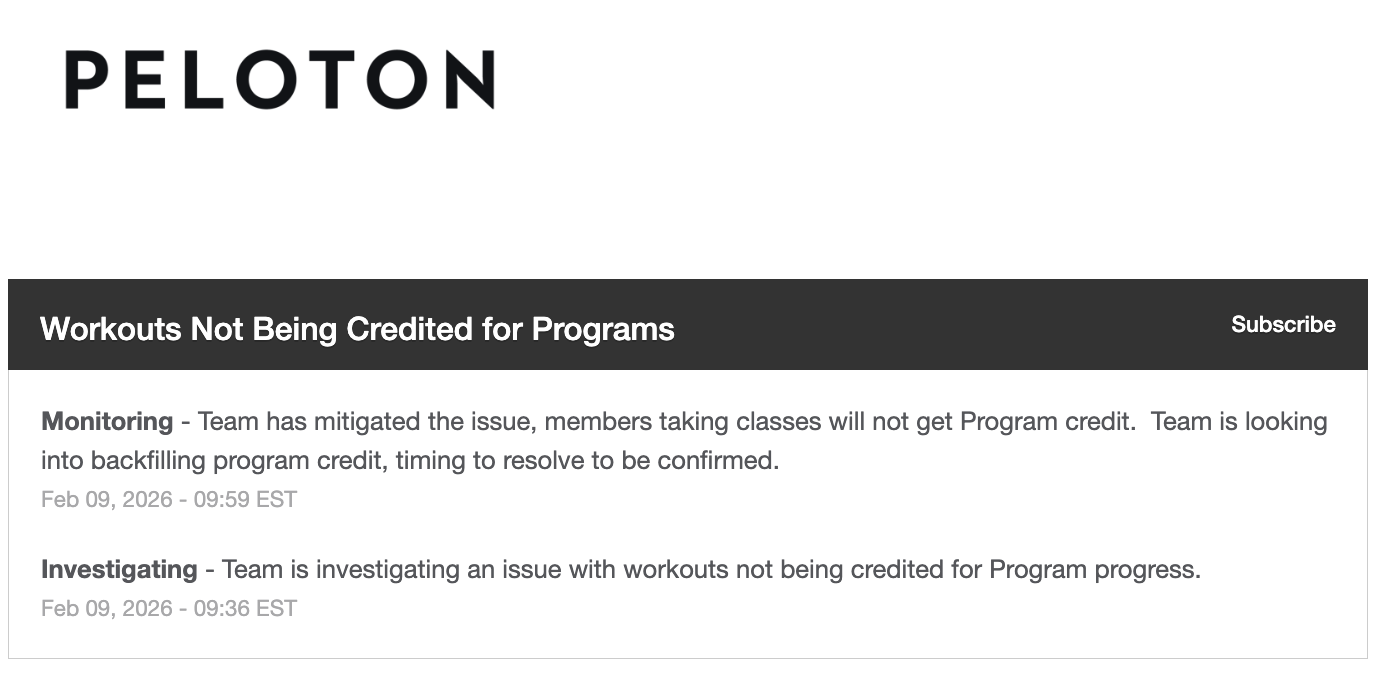
The good news is that Peloton has officially acknowledged the glitch. According to their status page, their engineering teams have identified that workouts are not being credited for Program progress.
As of the most recent update on February 9, 2026, the team stated they have “mitigated” the issue. In technical terms, this often means they have stopped the bleeding or isolated the cause, but the full solution is still in progress.
Importantly, they noted that they are looking into “backfilling program credit.” This is the reassurance many of us need. It suggests that you likely won’t have to retake those classes once the fix is deployed. The system should eventually recognize the work you have already done and update your status retroactively.
Why You Should Avoid the Support Chatbot
When things break, our first instinct is often to reach out to support. In this specific instance, we advise against using the automated Peloton customer support chatbot for this issue right now. We have seen reports of the chatbot providing erroneous advice.
How to Track the Fix
Instead of wrestling with support bots, the best source of truth is the official Peloton Status page.
You can view the specific incident report regarding classes not counting towards Programs here: https://status.onepeloton.com/
We recommend you go to that page and click the “Subscribe” button. You can enter your email address or phone number to get an immediate alert as soon as the status changes to “Resolved.”
What To Do in the Meantime
Patience is difficult with technological glitches, but it is the best strategy right now.
- Keep Working Out: Your physical effort still counts for your fitness, even if the digital badge is delayed.
- Don’t Retake Classes Yet: Since backfilling is being investigated, you may not need to repeat the work. Wait for the “Resolved” notification before making that decision.
- Check Your General History: verify that the class appears in your general workout history. As long as it is there, there is a record of your effort that Peloton can likely use to restore your Program credit later.
We will keep an eye on the situation and update our community if any manual workarounds become available. For now, going. Your credits will catch up eventually!
Is this happening to you? Let us know!
Tune in to The Clip Out every Friday to hear Tom and Crystal’s take on this and other hot Pelotopics. We’re available on Apple Podcasts, Spotify, Google Podcasts, iHeart, TuneIn. Be sure and follow us so you never miss an episode. You can also find the show online on Facebook.com/TheClipOut. While you’re there, like the page and join the group. Lastly, find us on our YouTube channel, YouTube.com/TheClipOut, where you can watch all of our shows.
See something in the Peloton Universe that you think we should know? Visit theclipout.com and click on Submit a Tip!
About the Author: Elizabeth Schlosberg

Latest Podcast


Subscribe
Keep up with all the Peloton news!